Introduction
Prepress automation software is a digital solution that automates the tasks completed before a file is printed. It helps commercial printers, packaging manufacturers, label converters, and publishing companies prepare artwork quickly and accurately for production. Instead of manually checking every design, operators can rely on automated workflows to detect errors, correct files, manage colors, and send jobs directly to print.
Modern print businesses face growing customer expectations for faster delivery, consistent quality, and lower production costs. Manual prepress processes often create delays because employees must inspect PDFs, fix missing fonts, adjust colors, and create proofs one job at a time. As order volumes increase, these repetitive tasks become expensive and increase the risk of human error.
Prepress automation software solves these challenges by improving speed, accuracy, and consistency across the entire production process. It reduces repetitive work while ensuring every print file meets technical standards before reaching the press. Whether you operate an offset printing company, a packaging plant, or a digital print shop, automation helps improve productivity and customer satisfaction. In this guide, you’ll learn how the software works, its essential features, its benefits, and how to choose the best solution for your business.
What Is Prepress Automation Software?
Prepress automation software is a specialized system that automates the preparation of digital artwork before printing begins. In simple words, it acts as an intelligent assistant that checks, repairs, organizes and routes print files through a predefined workflow without requiring constant manual intervention.
The main purpose of automating prepress operations is to eliminate repetitive tasks that traditionally consume valuable production time. Instead of employees opening every PDF individually, the software automatically verifies image resolution, bleed, fonts, color profiles, transparency, and PDF standards. Files that pass inspection continue through production, while problematic files are flagged or corrected automatically.
It is important to understand the difference between prepress automation software and general print management software. Print management systems mainly handle business operations such as quotations, scheduling, invoicing, and customer orders. Prepress automation software focuses specifically on artwork preparation, file quality, proofing, color accuracy, and production readiness.
Within the print production lifecycle, prepress automation sits between design creation and the actual printing stage. Designers submit artwork, the software prepares and validates it, and the approved files move to RIP processing before plates are produced or digital presses begin printing. This makes it essential for commercial printing, flexible packaging, folding cartons, labels, and publishing workflows.
How Prepress Automation Software Works?
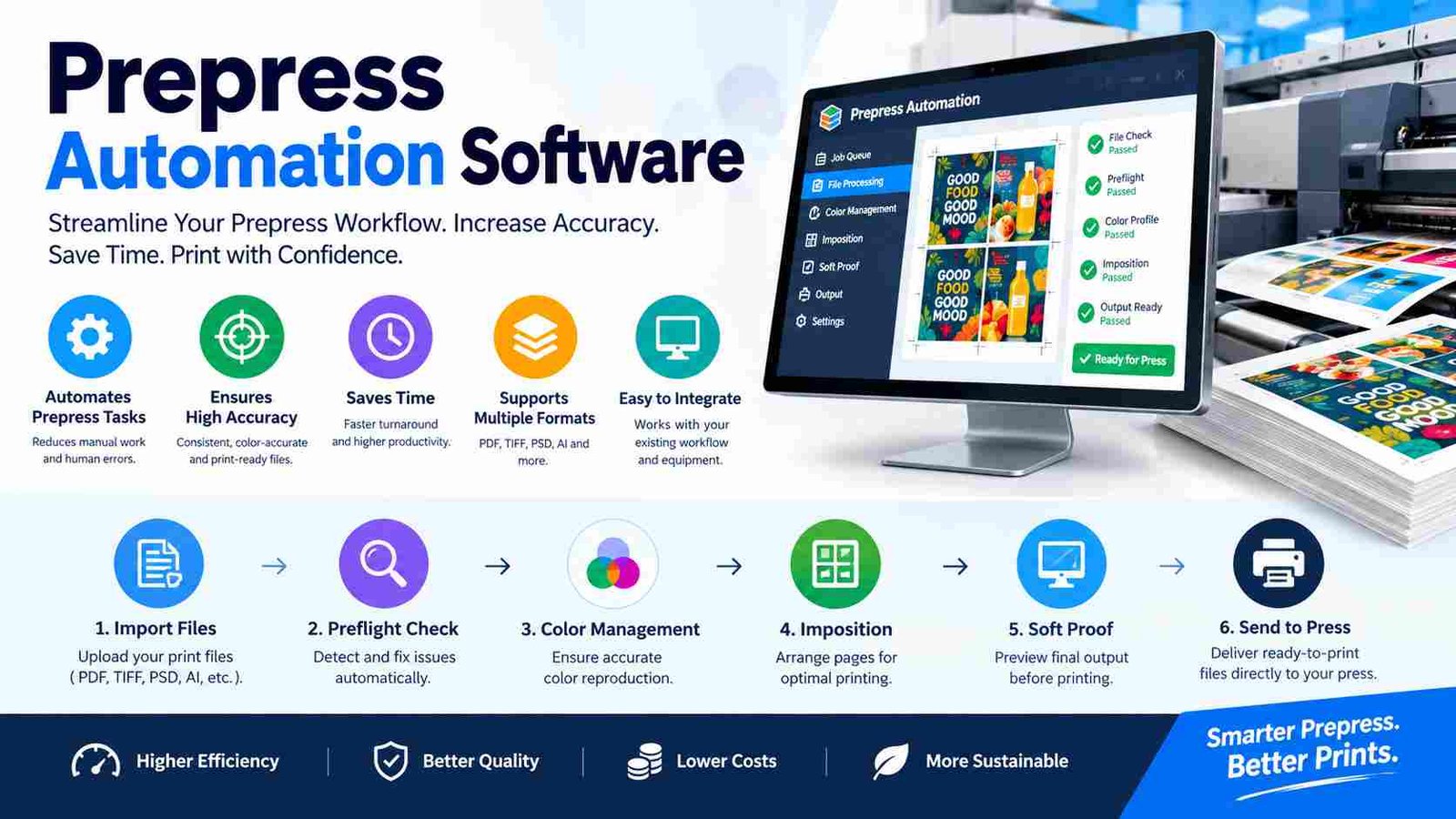
A complete prepress workflow follows a series of automated steps that transform customer artwork into production-ready print files. The process begins with file intake, where customers upload PDFs through web portals, email, hot folders, or integrated web-to-print systems. The software immediately captures job information and routes the file into the workflow.
Next comes automated preflight, where the system analyzes technical specifications. It checks image resolution, bleed, trim size, embedded fonts, transparency, color spaces, and PDF/X compliance. Any issues are identified within seconds instead of requiring manual inspection.
During error detection and file correction, intelligent rules automatically repair common problems. RGB images can be converted to CMYK, missing bleed can be flagged, low-resolution graphics can be identified, and overprint settings can be corrected where appropriate. This significantly reduces costly printing mistakes.
The workflow then applies color management, ensuring ICC profiles maintain consistent color reproduction across different presses and substrates. Afterward, trapping and imposition optimize how pages are arranged on printing sheets to reduce waste and improve efficiency.
Digital proofs are automatically generated and sent to customers for approval. Clients can annotate, compare versions, and approve artwork online, creating a complete approval history. Once approved, files move through RIP processing, where they are converted into printable data before being sent to either a computer-to-plate system or a digital printing press.
Core Features of Prepress Automation Software
The strength of prepress automation software lies in its ability to combine multiple production tools into one intelligent workflow. Rather than relying on separate applications, modern systems automate quality control, file repair, layout optimization, approvals, and production tracking from a single platform.
Automated PDF Preflight
PDF preflight is one of the most valuable features because it verifies whether artwork meets printing standards before production begins. The software automatically checks image resolution, bleed dimensions, trim marks, embedded fonts, color profiles, and PDF/X compliance. Instead of discovering problems after plates are created, printers identify issues immediately and prevent expensive reprints.
Intelligent File Correction
Advanced automation engines repair many common file problems without manual editing. RGB graphics are converted into CMYK, missing fonts are detected, transparency issues are corrected, and image quality is optimized. Overprint settings and color inconsistencies can also be standardized according to predefined production rules.
Workflow Automation and Imposition
Rule-based workflows automatically prioritize jobs, process files in batches, and route artwork to different departments based on customer requirements. Hot folders allow files to enter workflows instantly without operator involvement. Automated imposition creates efficient sheet layouts, step-and-repeat patterns for labels, and optimized signature arrangements that reduce paper waste.
Online Proofing, Color Management and Reporting
Digital proofing allows customers to review artwork remotely, add annotations, compare versions and approve jobs from any location. Integrated color management ensures accurate brand colors through ICC profiles and spot color handling. Meanwhile, dashboards provide production status, audit trails, processing logs, and performance reports that help managers identify workflow bottlenecks and improve operational efficiency.
Key Benefits of Prepress Automation Software
The biggest advantage of prepress automation software is its ability to increase productivity while reducing costly human errors. Print businesses often process hundreds of files daily, and manual checking creates delays that affect delivery times. Automation allows operators to complete more jobs with greater confidence and consistency.
Faster job turnaround is one of the most noticeable improvements. Files move automatically from upload to preflight, proofing, approval, and production without unnecessary waiting. This enables print companies to accept more orders while maintaining shorter delivery schedules.
Another major benefit is reduced manual labor. Skilled prepress technicians spend less time performing repetitive quality checks and more time solving complex production challenges. This improves employee efficiency and lowers operational costs without reducing quality standards.
Printing errors also decrease significantly because automated validation catches technical issues before production starts. Incorrect color profiles, missing fonts, low-resolution images, and improper bleed settings are identified early, preventing waste of paper, ink, and production time.
Consistency is equally important, especially for businesses producing branded packaging or recurring customer jobs. Automation applies identical production rules every time, ensuring reliable color accuracy and layout quality. Better quality leads to higher customer satisfaction, fewer complaints, and stronger long-term business relationships. Overall, prepress automation software creates a faster, more profitable, and more reliable print production environment.
Types of Prepress Automation Software
Different printing industries require different automation capabilities, so prepress automation software is available in several specialized categories. Choosing the correct type depends on the products your business manufactures and the complexity of your production workflow.
Commercial print workflow software is designed for brochures, catalogs, books, flyers, and marketing materials. It focuses on high-volume PDF processing, imposition, proofing, and offset production efficiency. These systems often integrate closely with printing presses and business management software.
Packaging prepress automation serves folding cartons, flexible packaging, and consumer product packaging. These workflows emphasize color accuracy, barcode verification, step-and-repeat layouts, and complex trapping for multiple printing substrates.
Label printing workflow software supports narrow-web label production by automating variable layouts, repeat patterns, and digital finishing requirements. It is particularly valuable for food, beverage, pharmaceutical, and cosmetic labels.
Newspaper and publishing prepress solutions prioritize page assembly, editorial workflows, automated pagination, and rapid deadline-driven production. Speed and version management are essential features in this sector.
Finally, digital print production software is optimized for short-run and personalized printing. It handles variable data, fast proof generation, and seamless integration with digital presses. Understanding these categories helps businesses invest in software that matches their production goals instead of paying for unnecessary features.
Who Should Use Prepress Automation Software?
Prepress automation software is valuable for organizations that process large volumes of print-ready artwork or require consistent production quality. Although commercial printing companies are the most common users, many other industries also benefit from automated workflows.
Commercial print shops use automation to reduce turnaround time for marketing materials, books, magazines, and promotional products. Faster preflight and proofing allow them to serve more customers without increasing staffing costs.
Packaging manufacturers rely heavily on automation because packaging artwork contains strict technical requirements, including barcodes, spot colors, dielines, and regulatory information. Automated validation reduces compliance risks and improves production accuracy.
Label converters also benefit from intelligent imposition, repeat layouts, and color consistency across thousands of product variations. Even small labeling errors can become expensive, making automation an important quality control tool.
Publishing companies use automated page assembly, proof generation, and editorial workflows to meet tight publication deadlines. Meanwhile, marketing print providers manage personalized campaigns more efficiently by automating repetitive production tasks.
Large corporations with in-house print departments can also improve productivity by integrating prepress automation into their internal document production processes. Whether producing packaging, catalogs, manuals, or labels, businesses that handle recurring print jobs typically gain measurable efficiency from automation.
Essential Integrations to Look For
A powerful prepress automation software platform should connect smoothly with the other systems used throughout your print business. Strong integrations eliminate duplicate data entry, reduce communication delays, and create a continuous digital workflow from customer order to final production.
Management Information Systems (MIS) connect customer orders, pricing, scheduling, and production planning with the prepress department. When an order is created, job specifications automatically flow into the workflow, reducing administrative work and minimizing data entry errors.
Enterprise Resource Planning (ERP) software links inventory, purchasing, finance, and manufacturing operations. This integration gives managers greater visibility into material usage, production costs, and operational performance across the business.
Digital Asset Management (DAM) systems organize logos, artwork, templates, and brand assets in one secure location. Designers and operators always access the latest approved files, preventing version confusion during production.
Web-to-print platforms allow customers to upload artwork directly into automated workflows, while RIP systems convert validated files into printable data for digital presses. Computer-to-plate devices receive approved layouts without manual intervention, creating a highly efficient production environment.
Modern prepress solutions also support API connectivity and JDF/JMF workflow standards, allowing different software platforms and production equipment to exchange information automatically. These integrations make automation scalable and future-ready for growing print businesses.
Best Prepress Automation Software Solutions
Several leading platforms dominate the professional prepress automation market, each serving different printing environments. The best choice depends on your production volume, business size, printing technology, and integration requirements rather than one universal winner.
| Software | Best For | Key Strength |
| Esko Automation Engine | Packaging | Workflow automation |
| Kodak Prinergy | Commercial print | End-to-end production |
| Heidelberg Prinect | Offset printing | Integrated workflow |
| HYBRID CLOUDFLOW | Labels & packaging | Cloud automation |
| Enfocus Switch | Workflow integration | Rule-based automation |
| OneVision | Publishing | File optimization |
| Xerox FreeFlow | Digital printing | Production workflow |
Large packaging companies often choose enterprise workflow platforms with advanced color management and automation, while commercial printers may prioritize integrated production management. Smaller businesses frequently benefit from flexible workflow solutions that can grow as production volumes increase. Before selecting software, evaluate compatibility with your presses, RIP systems, MIS, and customer ordering platforms to ensure long-term efficiency.
How to Choose the Right Prepress Automation Software?
Selecting the right prepress automation software requires more than comparing feature lists. The best solution is the one that matches your production workflow, customer requirements, and future business growth.
Business size is an important starting point. Small print shops may only need automated preflight and proofing, while enterprise manufacturers often require advanced workflow orchestration, ERP integration, and multi-site production management.
Print volume also influences the decision. High-volume facilities benefit from batch processing, hot folders, and automatic job routing because these features reduce manual intervention during busy production periods. Lower-volume businesses may prioritize ease of use and affordable deployment.Another consideration is whether your company focuses on packaging, commercial printing, labels, or digital production. Each industry has unique technical requirements that specialized software handles more effectively.
Cloud versus on-premise deployment depends on your IT strategy. Cloud systems simplify updates and remote collaboration, while on-premise installations provide greater control over infrastructure and customization. Finally, evaluate scalability, vendor support, training resources, API availability, and integration with existing equipment before making an investment. A carefully planned purchase delivers better long-term value than simply choosing the platform with the longest feature list.
Cloud vs On-Premise Prepress Automation Software
Many businesses must decide whether cloud or on-premise deployment is the better choice for their production environment. Both options offer powerful automation, but they differ in flexibility, infrastructure, and long-term management.
| Feature | Cloud | On-Premise |
| Deployment | Web-based | Local servers |
| Remote access | Yes | Limited |
| Updates | Automatic | Manual |
| Initial cost | Lower | Higher |
| Custom control | Moderate | High |
Cloud-based prepress automation software is ideal for businesses that want easier deployment, remote collaboration, and automatic software updates. Teams can access workflows from multiple locations, making it especially useful for organizations with distributed production or remote customer approvals.
On-premise solutions are often preferred by large manufacturing companies with dedicated IT departments. They offer greater control over security, infrastructure, and customized workflows, although they typically require higher upfront investment and ongoing maintenance.The right deployment model depends on your technical resources, security requirements, budget and operational goals rather than one approach being universally better.
Common Challenges and How Automation Solves Them
Prepress departments encounter many repetitive problems that slow production and increase costs. Automation addresses these issues through standardized workflows and intelligent quality control.
| Challenge | Software Solution |
| Incorrect PDFs | Automated preflight |
| Missing fonts | Font validation |
| Wrong colors | ICC color management |
| Slow approvals | Digital proofing |
| Manual routing | Workflow rules |
| Version confusion | Version control |
Instead of discovering technical issues during printing, automated validation identifies them immediately after file submission. Digital proofing accelerates customer communication, while workflow rules eliminate unnecessary manual routing between departments. These improvements reduce waste, improve delivery times, and create a more reliable production process for both printers and customers.
Implementation Best Practices
Successful implementation begins by mapping your existing workflow from artwork submission to final printing. Understanding current bottlenecks helps identify which tasks should be automated first. Businesses should also standardize print specifications, including PDF standards, color profiles, bleed requirements, and naming conventions before creating automation rules.
Training is equally important because operators need to understand how automated decisions are made and when manual intervention is necessary. Integrating the software with MIS, ERP, DAM, RIP, and web-to-print platforms creates a connected production ecosystem that minimizes duplicate work.
Finally, monitor key performance indicators such as turnaround time, error rates, approval speed, and production efficiency. Continuous optimization ensures the automation workflow evolves alongside changing customer needs and business growth.
Future Trends in Prepress Automation Software
The future of prepress automation software is becoming increasingly intelligent. Artificial intelligence is helping systems recognize artwork problems, recommend corrections, and improve file quality with less operator involvement. Rather than replacing technicians, AI supports faster decision-making during production.
Cloud-native production environments are also expanding because they enable real-time collaboration between designers, customers, and print facilities. Automated quality inspection is improving with computer vision technologies that verify artwork consistency before printing begins.
Another important trend is API-first integration, allowing software platforms, presses, finishing equipment, and business systems to communicate seamlessly. Real-time production analytics give managers deeper insight into workflow performance, helping identify delays and improve operational efficiency. As automation becomes smarter and more connected, print businesses can deliver higher quality while responding more quickly to customer demands.
Frequently Asked Questions
1. What is prepress automation software?
Prepress automation software is a digital solution that automatically checks, repairs, organizes, and prepares print files before they are sent to a printing press, reducing manual work and improving accuracy.
2. What is the difference between prepress automation and print workflow software?
Prepress automation focuses on artwork preparation, preflight, proofing, color management, and imposition, while print workflow software often includes broader business functions such as estimating, scheduling, and job management.
3. Can prepress automation software automatically fix PDF errors?
Yes. Many platforms automatically correct common issues such as RGB color conversion, missing fonts, transparency problems, and PDF compliance. However, complex design errors may still require manual review.
4. Which industries benefit most from prepress automation software?
Commercial printing, packaging manufacturing, label production, newspaper publishing, book printing, and digital print providers all benefit from faster, more accurate prepress workflows.
5. Does prepress automation software integrate with MIS and ERP systems?
Most professional solutions support MIS, ERP, DAM, RIP, web-to-print platforms, APIs, and JDF/JMF standards, allowing information to flow automatically across the entire production process.
Conclusion
Prepress automation software transforms traditional print production by replacing repetitive manual tasks with fast, intelligent workflows. From automated preflight and color management to proofing, imposition, and production tracking, it helps businesses reduce errors while improving speed and consistency. The best solution depends on your print volume, business size, production type, and integration requirements rather than a single software platform. By choosing the right workflow and implementing automation carefully, print companies can increase productivity, lower costs and deliver higher-quality results in today’s competitive printing industry.