Introduction
Running a busy restaurant or commercial kitchen requires speed, accuracy, and excellent teamwork. A single delayed order, missing ingredient, or inventory mistake can affect customer satisfaction and reduce profits. This is why many food businesses now use kitchen management software to organize daily kitchen operations more efficiently.
Kitchen management software is a digital system that helps restaurants manage orders, recipes, inventory, food costs, staff tasks, and kitchen workflows from one place. Instead of relying on paper tickets and manual records, kitchens can automate many routine tasks and reduce human errors.
Whether you own a restaurant, café, bakery, hotel kitchen, cloud kitchen, or catering business, the right software can improve productivity while lowering operating costs. Modern systems also integrate with POS terminals, Kitchen Display Systems (KDS), online ordering platforms, and accounting tools for a smoother workflow.
In this complete guide, you’ll learn how kitchen management software works, its essential features, the benefits it offers, how to choose the best solution, and the leading software options available in 2026.
What Is Kitchen Management Software?
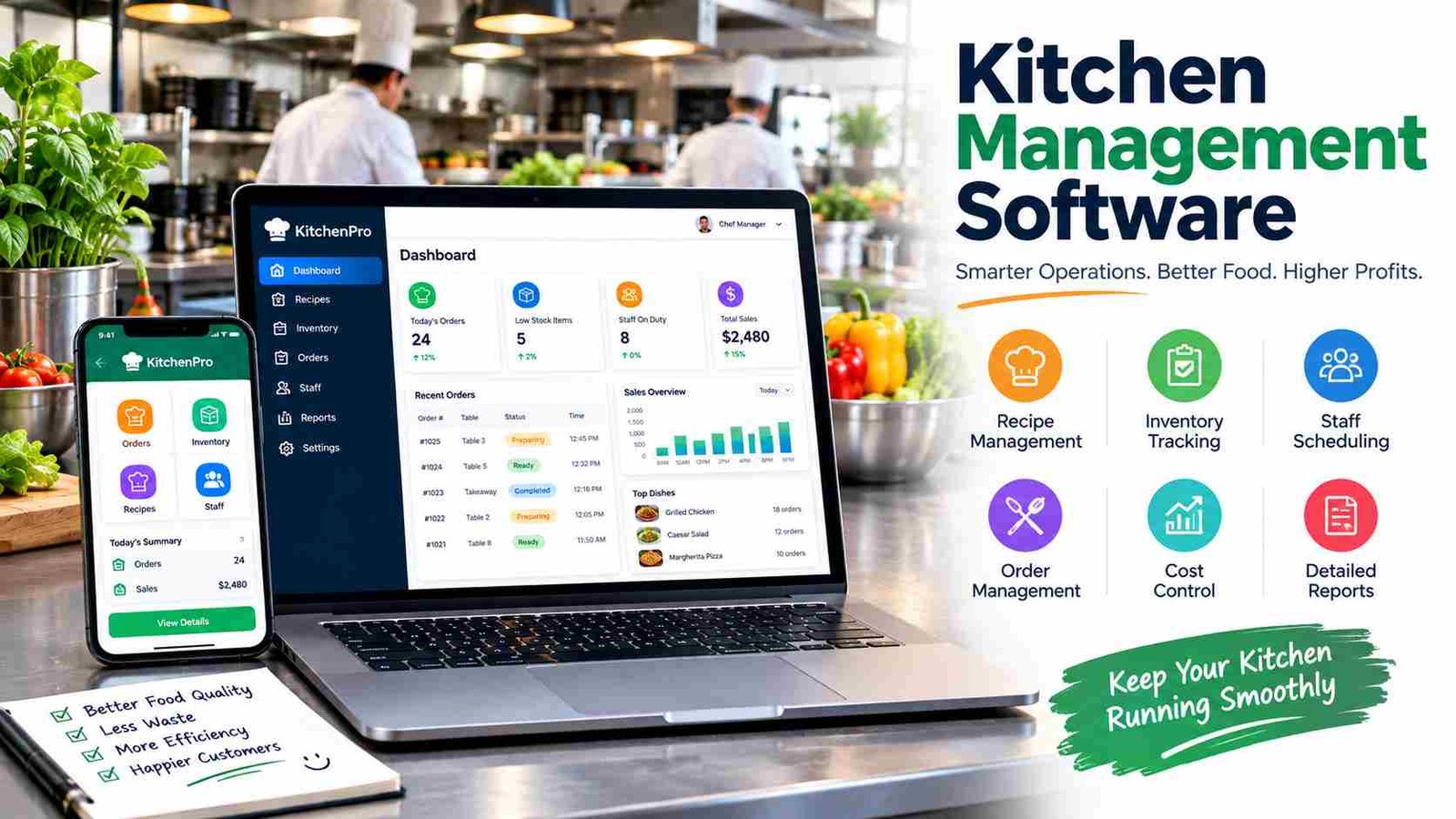
Kitchen management software is a digital platform designed to manage back-of-house restaurant operations. It brings together orders, inventory, recipes, food costing, staff coordination, and reporting into one centralized system. Instead of handling multiple spreadsheets or paper records, managers can monitor the entire kitchen from a single dashboard.
How does it work in a restaurant kitchen?
The software connects different parts of the restaurant. Customer orders from the POS system or QR menu are instantly sent to the kitchen display. Chefs prepare meals based on digital tickets, while inventory automatically updates as ingredients are used. Managers can then view sales, waste, and performance reports in real time.
Who uses kitchen management software?
This technology is useful for restaurants, cafés, bakeries, hotels, cloud kitchens, catering companies, and institutional kitchens such as schools and hospitals. Any business preparing food at scale can benefit from a structured digital workflow.
Kitchen management software vs restaurant management software
Restaurant management software often covers customer-facing activities like reservations, billing, and payments. Kitchen management software focuses specifically on back-of-house operations, ensuring food preparation is organized, accurate, and efficient. Many businesses integrate both systems to create a complete restaurant management solution.
How Kitchen Management Software Works?
A modern kitchen depends on smooth communication between the dining area and the cooking staff. Kitchen management software automates this communication and reduces delays caused by manual processes.
When a customer places an order through a POS terminal, self-order kiosk, QR menu, or online delivery app, the order is instantly transferred to the kitchen. Instead of printing paper tickets, the Kitchen Display System (KDS) shows the order on a digital screen. Chefs can prioritize orders, track cooking times, and mark completed dishes with a single touch.
Once an order is finished, servers receive a notification that it is ready to serve. At the same time, the software deducts ingredient quantities from inventory and records the transaction for reporting. Managers can later analyze preparation times, peak business hours, and food costs to improve kitchen performance.
Kitchen workflow table
| Step | What happens |
| 1 | Customer places an order |
| 2 | POS or QR system sends ticket |
| 3 | KDS displays the order |
| 4 | Kitchen prepares the meal |
| 5 | Staff marks order as ready |
| 6 | Inventory updates and reports are generated |
This automated workflow reduces communication gaps and creates a faster, more organized kitchen.
Core Features of Kitchen Management Software
The best kitchen management software combines several powerful tools that simplify daily operations. Rather than solving only one problem, it creates a complete management system for the entire kitchen.
The Kitchen Display System (KDS) is one of the most valuable features. It replaces paper kitchen tickets with digital screens, helping chefs receive orders instantly and organize cooking priorities. Real-time order management ensures every order is tracked from preparation to completion, reducing missed or delayed meals.
Inventory tracking automatically records ingredient usage whenever a dish is prepared. Managers receive alerts when stock levels become low, making purchasing more accurate. Recipe and menu management allow businesses to standardize ingredients, cooking instructions, and portion sizes across multiple locations.
Food cost calculation is another essential feature because it measures the exact ingredient cost of every menu item. This helps restaurants price dishes more profitably. Purchase and supplier management keeps vendor information organized, while staff task management improves teamwork during busy shifts. Finally, reporting and analytics provide valuable insights into sales trends, kitchen efficiency, waste levels, and employee productivity.
Feature comparison table
| Feature | Purpose |
| Kitchen Display System | Digital order processing |
| Inventory Tracking | Monitor ingredients automatically |
| Recipe Management | Standardize menu preparation |
| Food Costing | Calculate dish profitability |
| Waste Tracking | Reduce food waste |
| Staff Management | Assign kitchen tasks |
| Analytics | Measure kitchen performance |
Benefits of Using Kitchen Management Software
Restaurants operate on small profit margins, so improving efficiency can make a significant difference. Kitchen management software helps businesses save time, reduce costs, and deliver better customer experiences.
One of the biggest benefits is faster service. Digital orders reach the kitchen instantly, eliminating delays caused by handwritten tickets or verbal communication. This improves table turnover and customer satisfaction during peak hours.
The software also reduces order mistakes by providing clear digital instructions. Inventory accuracy improves because ingredient quantities update automatically after every completed order. This helps prevent unexpected stock shortages and over-ordering.
Food waste is another major expense for restaurants. By tracking ingredient usage and identifying waste patterns, managers can adjust purchasing decisions and improve recipe consistency. Lower waste leads directly to higher profits.
Multi-location restaurants benefit from centralized management. Owners can monitor inventory, recipes, sales, and kitchen performance across different branches from a single dashboard. Better reporting also supports smarter business decisions because managers can identify popular menu items, busy hours, and labor requirements more easily.Overall, kitchen management software creates a more productive workplace while helping businesses grow sustainably.
Types of Kitchen Management Software
Different food businesses have different operational needs, so kitchen management software is available in several specialized forms.
Restaurant kitchens typically require order management, KDS, inventory, and recipe costing. Fast-service restaurants also prioritize speed and integration with POS systems.
Cloud kitchens depend heavily on online ordering platforms and delivery integrations. Since they operate without dine-in customers, automated order routing and multi-brand management are especially important.
Hotel kitchens usually manage room service, restaurants, banquet events, and multiple food outlets. Their software often includes advanced production planning and supplier management.
Bakeries benefit from ingredient batch tracking, production scheduling, and recipe scaling for consistent product quality. Catering businesses need event-based planning, bulk production, and mobile staff coordination.
Institutional kitchens in schools, hospitals, and universities focus on nutrition planning, portion control, and large-volume meal preparation. Choosing software designed for your business type ensures better workflow and fewer unnecessary features.
Kitchen Display System (KDS) Explained
A Kitchen Display System (KDS) is a digital screen that replaces traditional printed kitchen tickets. It receives customer orders directly from the POS system and displays them in real time for the cooking staff.
Paper tickets can easily become lost, damaged, or difficult to read during busy service. Digital screens solve these problems by presenting clear order details, cooking notes, and preparation priorities. Chefs can sort orders by time, station, or urgency, making kitchen coordination much more efficient.
A KDS also improves communication between servers and chefs. Instead of shouting orders across the kitchen, staff receive instant digital updates when meals are ready. This reduces confusion and creates a smoother dining experience.
For best results, restaurants should position display screens at each cooking station, organize menu items consistently, and train employees to update order status immediately. Combined with kitchen management software, a KDS becomes one of the most effective tools for improving restaurant speed and accuracy.
Inventory & Food Cost Management
Controlling food costs is essential for restaurant profitability. Kitchen management software connects recipes with inventory, allowing businesses to monitor every ingredient from purchase to plate.
Ingredient-level inventory records the quantity of each item, including vegetables, meat, spices, and beverages. Whenever a menu item is sold, the software automatically deducts the required ingredients based on its recipe. This creates accurate stock levels without manual counting.
Low-stock alerts notify managers before essential ingredients run out, helping avoid service interruptions. Recipe costing calculates the exact cost of producing each dish, including ingredient quantities and current purchase prices. Managers can then adjust menu pricing to protect profit margins.
Profit tracking goes beyond individual recipes by comparing food costs with sales performance. Reports identify which dishes generate the highest profit and which items may need recipe adjustments. This combination of inventory accuracy and financial visibility helps restaurants reduce waste while making smarter purchasing decisions.
Kitchen Management Software vs POS Software
Although these systems often work together, they serve different purposes within a restaurant.
| Feature | Kitchen Software | POS Software |
| Kitchen workflow | Yes | Limited |
| Billing | No | Yes |
| Inventory | Yes | Yes |
| Recipe costing | Yes | Sometimes |
| Kitchen Display | Yes | Optional |
| Customer payments | No | Yes |
A POS system focuses on customer transactions, payments, receipts, and sales. Kitchen management software manages food preparation, inventory, recipes, and kitchen operations. Many modern restaurants integrate both platforms so that customer orders flow automatically from the POS into the kitchen, creating a seamless operational process.
Essential Integrations You Should Look For
The value of kitchen management software increases when it connects with other business tools. POS integration ensures orders move directly into the kitchen without manual entry. Online ordering and QR menu systems allow customers to place orders digitally, while delivery platforms automatically synchronize takeaway requests.
Accounting software helps transfer sales and purchasing data into financial records, reducing bookkeeping work. Payment gateway integration supports faster customer transactions, and supplier management simplifies purchasing by tracking vendor information and order history. Businesses planning long-term growth should prioritize software with flexible integrations because it reduces duplicate work and improves automation across departments.
How to Choose the Best Kitchen Management Software?
Selecting the right solution depends on your business size and operational needs. Small cafés may only require basic KDS and inventory tools, while multi-location restaurants often need advanced reporting and centralized management.
Cloud-based software is ideal for businesses wanting remote access and automatic updates. On-premise solutions offer greater hardware control but usually require higher upfront investment. Ease of use is equally important because complicated software can slow employee adoption.
Buyer checklist
- Supports POS integration
- Includes Kitchen Display System
- Tracks inventory automatically
- Offers recipe costing
- Provides mobile access
- Works offline if internet fails
- Scales for multiple branches
- Transparent pricing and support
Choosing scalable software helps avoid expensive system replacements as your business grows.
Best Kitchen Management Software Solutions (2026)
Several reliable platforms serve different restaurant sizes and business models. The best choice depends on your budget, required features, and number of locations.
| Software | Best For | Cloud | KDS | Multi-Branch |
| Oracle MICROS | Large restaurants & hotels | Yes | Yes | Yes |
| Toast | Full-service restaurants | Yes | Yes | Yes |
| Square for Restaurants | Small cafés & quick service | Yes | Yes | Yes |
| Lightspeed Restaurant | Growing restaurant chains | Yes | Yes | Yes |
| Restozay | Restaurants in Pakistan | Yes | Yes | Yes |
| IT Vision | Hospitality businesses in Pakistan | Yes | Yes | Yes |
Rather than choosing the platform with the most features, businesses should focus on ease of use, reliable customer support, and compatibility with existing restaurant systems.
Cloud-Based vs On-Premise Kitchen Management Software
| Cloud-Based | On-Premise |
| Remote access | Local installation |
| Monthly subscription | One-time license |
| Automatic updates | Manual updates |
| Easy scaling | More hardware control |
Cloud solutions are popular because managers can monitor kitchen operations from anywhere using mobile devices or laptops. Updates happen automatically, and adding new restaurant branches is generally easier. On-premise software offers greater control over local infrastructure and may suit businesses with strict internal IT requirements. The right choice depends on budget, internet reliability, and long-term expansion plans.
Common Challenges and How Kitchen Software Solves Them
Busy kitchens face recurring operational problems that reduce efficiency and increase costs. Fortunately, kitchen management software addresses many of these issues through automation.
| Challenge | Software Solution |
| Lost orders | Digital KDS tickets |
| Slow communication | Real-time status updates |
| Inventory shortages | Automatic stock alerts |
| Food waste | Ingredient tracking |
| Recipe inconsistency | Standardized recipes |
| Staff coordination | Task assignment tools |
| Peak-hour delays | Order prioritization |
By replacing manual processes with digital workflows, restaurants improve consistency while delivering faster service during their busiest hours.
Future Trends in Kitchen Management Software
The future of kitchen management software focuses on smarter decision-making rather than simply automating tasks. AI-powered analytics help managers predict busy periods, identify popular menu items, and optimize staffing schedules. Predictive inventory planning estimates future ingredient demand based on historical sales, reducing unnecessary waste.
Smart recipe optimization can suggest portion adjustments and ingredient substitutions that improve profitability without affecting quality. IoT-enabled kitchen equipment may also connect ovens, refrigerators, and cooking stations with management software for better monitoring. Real-time dashboards will continue giving owners instant visibility into food costs, labor efficiency and kitchen performance across multiple locations.
Frequently Asked Questions
1. Can kitchen management software work without the internet?
Yes. Many systems offer offline mode, allowing kitchens to continue processing orders until the internet connection returns.
2. Is kitchen management software suitable for food trucks?
Yes. Mobile-friendly solutions work well for food trucks, pop-up kitchens, and small takeaway businesses.
3. How long does it take to implement the software?
Most cloud-based systems can be set up within a few days, while larger multi-branch installations may take several weeks.
4. Can the software track expired ingredients?
Yes. Many platforms monitor expiry dates and help reduce waste by alerting staff before products expire.
5. Does kitchen management software improve customer satisfaction?
Yes. Faster preparation, fewer order mistakes, and better kitchen communication often lead to quicker service and happier customers.
Conclusion
Kitchen management software has become an essential tool for restaurants, cafés, hotels, cloud kitchens, and catering businesses that want to improve efficiency and reduce costs. By combining digital order management, inventory tracking, recipe costing, Kitchen Display Systems, and real-time reporting, it helps kitchens operate more accurately and profitably.
The best solution is one that matches your business size, integrates with your existing POS system, and can grow as your operations expand. Before purchasing, compare features, scalability, customer support, and pricing to ensure you choose software that delivers long-term value for your kitchen.