Introduction
Managing a swimming pool today involves much more than selling entry tickets. Pool owners need to handle admissions, memberships, reservations, retail sales, food counters, inventory, and customer records—all while providing visitors with a fast and enjoyable experience. This is where swimming pool POS software becomes an essential business tool.
Unlike traditional cash registers, a swimming pool POS system is designed specifically for aquatic facilities. It combines ticketing, membership management, payment processing, digital check-in, reporting, and inventory into one easy platform. Whether you operate a public pool, private swim club, hotel pool, resort, or water park, the software helps reduce manual work and improve daily operations.
Digital ticketing also increases convenience for customers. Visitors can use QR codes, RFID cards, or mobile memberships to enter quickly, while managers receive accurate attendance and revenue reports in real time. In this guide, you will learn how swimming pool POS software works, its most valuable features, pricing models, the best software solutions available, and how to choose the right system for your facility.
What Is Swimming Pool POS Software?
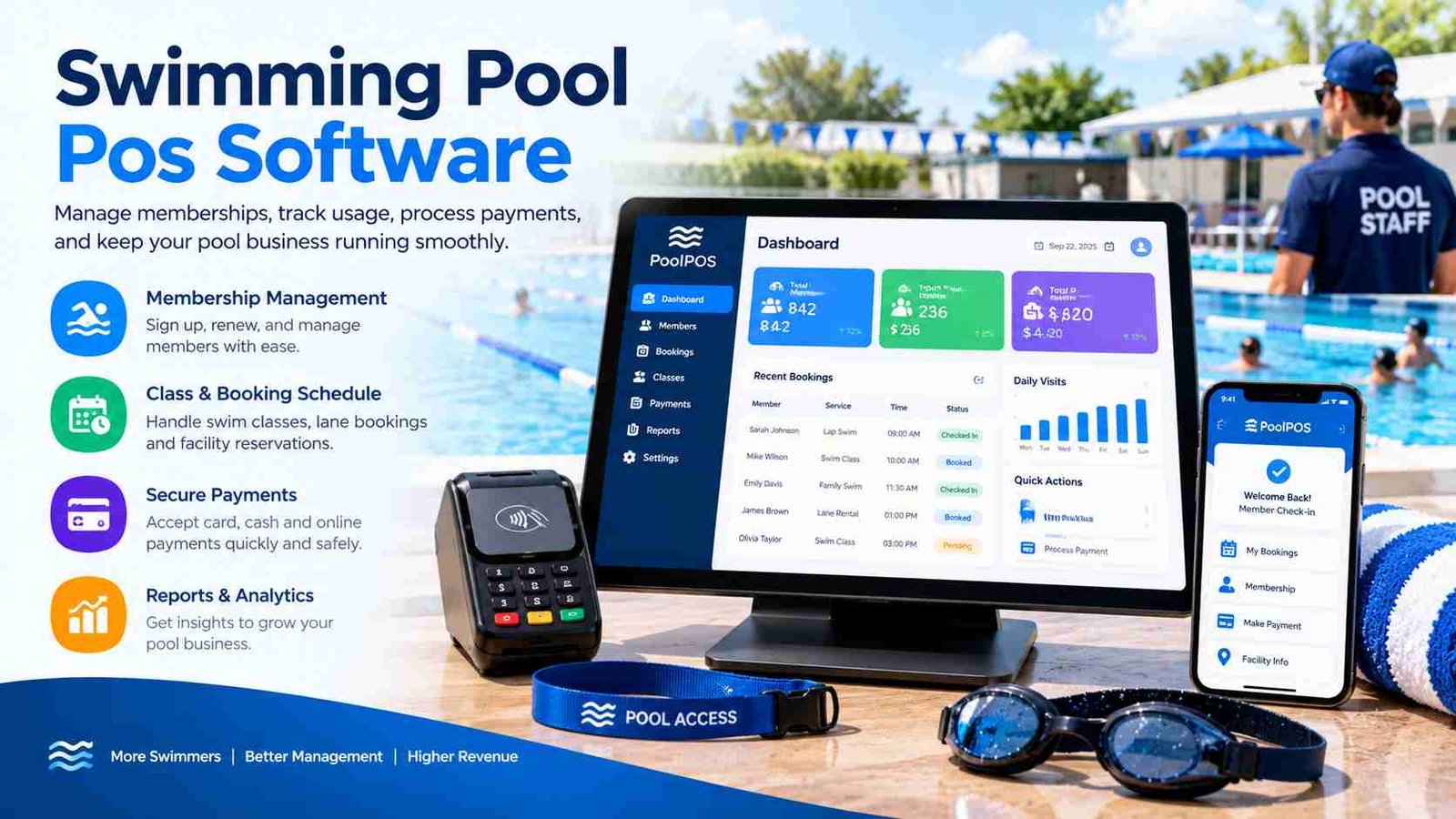
Swimming pool POS software is a specialized point-of-sale system built for swimming pools and aquatic businesses. It allows facilities to manage admissions, memberships, retail sales, reservations, and customer information from a single dashboard. Instead of using separate tools for billing and attendance, everything is connected in one system.
The software is commonly used by public swimming pools, water parks, swim clubs, hotels, resorts, fitness centers, and swimming academies. Each type of business has different operational needs, but they all benefit from faster check-ins, automated billing, and better customer management.
A modern swimming pool POS system usually operates in the cloud. Cloud-based software stores data securely online, allowing managers to access reports from any device with internet access. It also makes software updates and backups automatic. Desktop systems, on the other hand, store information on a local computer. While they may work without constant internet access, they usually offer less flexibility for multi-location businesses and remote management.
The biggest advantage of swimming pool POS software is its ability to connect every part of the customer journey—from purchasing a ticket to buying snacks and renewing memberships—without creating duplicate records or manual paperwork.
How Does Swimming Pool POS Software Work?
A swimming pool POS system follows a simple workflow that makes customer service faster and more accurate. When a visitor arrives, the cashier selects the appropriate ticket type or searches for the customer’s membership profile. The software instantly verifies whether the membership is active or if a new ticket is required.
After verification, the customer checks in using a QR code, barcode ticket, RFID wristband, or digital membership card. This process helps reduce long queues during busy weekends and holiday seasons. If the facility has capacity limits, the software automatically tracks the number of visitors inside the pool.
Customers can then purchase additional services such as swimming lessons, lane reservations, pool party bookings, snacks, drinks, or swimming accessories. Every purchase is added to the same customer account, making checkout simple and organized.
The payment stage supports cash, debit cards, credit cards, QR payments, and mobile wallets. Once payment is completed, the customer receives a printed or digital receipt. Behind the scenes, inventory updates automatically, attendance reports refresh in real time, and managers can immediately view daily sales and visitor statistics without manual calculations.
Core Features of Swimming Pool POS Software
A high-quality swimming pool POS solution offers much more than payment processing. It becomes the operational center of the entire facility by connecting admissions, retail, memberships, staff, and reporting into one platform.
Ticketing & Admission Management
Ticketing tools allow pools to create flexible pricing for adults, children, seniors, families, and groups. Facilities can also offer hourly passes, full-day tickets, seasonal passes, and special event admissions. Digital ticketing reduces printing costs while making entry much faster for visitors.
Membership Management
Membership management stores customer profiles, visit history, renewal dates, and household accounts. Families can share memberships under one account, and automatic renewal reminders help improve customer retention throughout the year.
POS Billing System
The billing system processes cash, card, QR, and mobile payments while supporting split payments, refunds, promotional discounts, and gift vouchers. Fast checkout helps reduce waiting time at busy reception desks.
Snack Bar, Retail & Inventory
Many pools sell drinks, towels, goggles, swim caps, and sunscreen. The POS tracks product categories, updates stock levels instantly, sends low-stock alerts, and records supplier information for easier inventory management.
Check-In, Reservations & Staff Tools
Digital check-in supports QR codes, RFID cards, barcode tickets, and mobile member passes. Reservation tools manage swim lessons, lane bookings, pool parties, waitlists, and visitor capacity. Staff management includes role-based permissions, cashier accounts, lifeguard scheduling, secure PIN logins, and shift tracking.
Reporting & Analytics
Managers receive real-time reports showing daily revenue, attendance, peak visiting hours, membership growth, best-selling products, and financial summaries. These insights help improve staffing decisions and business profitability.
Benefits of Using Swimming Pool POS Software
Investing in swimming pool POS software improves both customer satisfaction and operational efficiency. One of the biggest advantages is faster customer check-in. Digital memberships and QR scanning allow visitors to enter within seconds, reducing congestion at reception during busy periods.
Revenue also increases because the software makes it easier to sell additional products and services. Staff can quickly recommend swimming lessons, seasonal memberships, food, beverages, or pool accessories during checkout. Since every transaction is recorded automatically, billing errors become much less common.
Inventory management is another major benefit. Instead of manually counting products, managers always know current stock levels and receive alerts before popular items run out. This prevents lost sales and improves purchasing decisions.
The software also helps retain members by storing customer history, sending renewal reminders, and offering loyalty promotions. Administrative tasks such as daily reporting, cash reconciliation, and attendance tracking become automated, saving valuable staff time.
For business owners, accurate analytics provide better visibility into visitor trends, peak operating hours, and financial performance. As a result, swimming pool POS software creates a smoother customer experience while helping facilities become more profitable and easier to manage.
Who Needs Swimming Pool POS Software?
Different aquatic businesses use swimming pool POS software in unique ways, but the goal is always the same: efficient operations and better customer service.
Public swimming pools need affordable ticketing, crowd management, and fast admissions for hundreds of daily visitors. Digital attendance reports also help local authorities monitor facility usage.
Private swim clubs focus heavily on memberships, family accounts, recurring renewals, and member loyalty. Personalized customer profiles make communication much easier.Hotels and resorts often connect pool access with guest room accounts. Visitors can charge food, beverages, towels, and cabana rentals directly to their accommodation bill.
Water parks require advanced ticket categories, seasonal passes, group pricing, and high-volume payment processing. Capacity management is especially important during holidays.Aquatic fitness centers manage swim classes, lane reservations, instructor schedules, and recurring class memberships. Integrated scheduling prevents booking conflicts.
Swimming academies benefit from student records, lesson packages, attendance tracking, instructor payments, and parent communication. The software keeps educational and financial information organized in one place, making administration much more efficient.
Swimming Pool POS Software vs Traditional Cash Register
A traditional cash register records payments, but it cannot manage memberships, reservations, or customer data. Swimming pool POS software provides a complete business management solution.
| Feature | Swimming Pool POS Software | Traditional Register |
| Ticketing | Yes | Limited |
| Membership Management | Yes | No |
| Inventory Tracking | Real-time | Basic |
| Lane & Event Reservations | Yes | No |
| Customer Database | Included | No |
| Digital Check-In | Yes | No |
| Sales Reports | Advanced Analytics | Basic Totals |
| Multi-Payment Support | Yes | Limited |
For growing aquatic facilities, the difference is significant. A specialized POS system reduces manual work while improving accuracy across every department.
Essential Features to Look for Before Buying
Choosing the right swimming pool POS software requires looking beyond price alone. The best solution should match both your current needs and future business growth.
Cloud synchronization allows managers to access reports from multiple devices and locations. Offline mode is equally important because reception desks should continue processing payments even during temporary internet outages.
Multi-location support is valuable for organizations operating several swimming pools or fitness centers. Mobile POS functionality enables staff to accept payments anywhere around the facility, including outdoor events or poolside cafés.
Integrated payment gateways simplify secure card and mobile transactions, while accounting integrations reduce bookkeeping work by automatically syncing financial records. Email and SMS notifications help remind customers about membership renewals, reservations, and special promotions.
Digital waivers eliminate paper forms and improve the customer registration process. Strong data security, user permissions, encrypted payments, and automatic cloud backups protect both business information and customer records.
Before making a final decision, always request a free demo. Testing the software with your own staff helps identify whether the interface is easy to use during real customer interactions.
Best Swimming Pool POS Software Solutions
Several excellent platforms serve different types of aquatic businesses. The right choice depends on your facility size, services, and revenue model.
PoolPulse
Best for swim clubsPoolPulse is designed specifically for swim clubs and aquatic facilities. It offers membership management, digital check-ins, reservations, POS billing, attendance tracking, and reporting in one cloud platform.
Pros: Strong membership tools, easy reservations, cloud reporting.Limitations: May include more features than very small community pools need.
AquaPOS
Best for pools with restaurantsAquaPOS combines pool admissions with restaurant billing, retail inventory, staff permissions, and customer accounts, making it ideal for facilities with multiple revenue streams.
Pros: Excellent food service integration and inventory management.Limitations: Restaurant features may be unnecessary for simple swimming pools.
Lightspeed Retail POS
Best for pool supply storesLightspeed Retail POS is well suited for businesses selling swimming equipment and accessories. It provides advanced inventory, customer loyalty programs, mobile payments, and service scheduling.
Pros: Powerful retail tools and flexible inventory features.Limitations: Less specialized for pool admissions than dedicated aquatic software.
How Much Does Swimming Pool POS Software Cost?
Pricing depends on software features, business size, and deployment method. Small community pools often choose monthly subscriptions because they require little upfront investment. Larger organizations sometimes prefer enterprise plans with advanced reporting and multi-location management.
Cloud-based systems usually include automatic updates, backups, and customer support within the subscription fee. On-premise software may require a higher one-time license but gives businesses more control over local infrastructure. Hardware costs should also be considered, including receipt printers, barcode scanners, cash drawers, tablets, and RFID readers.
Payment processing fees vary depending on the payment gateway, while optional modules such as online booking, SMS notifications, or accounting integration may increase monthly costs.
| Business Size | Typical Pricing Model |
| Small Community Pool | Monthly subscription |
| Swim Club | Monthly + membership module |
| Hotel or Resort | Custom business plan |
| Water Park | Enterprise pricing |
| Multi-Location Operator | Custom scalable solution |
Instead of choosing the cheapest option, calculate the total value by comparing automation, customer experience, reporting, and future scalability.
How to Choose the Right Swimming Pool POS Software?
Selecting the best swimming pool POS software starts with understanding your business goals. A small neighborhood pool has very different requirements than a large water park serving thousands of visitors each day.
First, define your facility size and estimate daily visitor numbers. This helps determine whether you need basic admissions or enterprise-level capacity management. Next, identify every revenue source, including tickets, memberships, lessons, retail products, food service, rentals, and special events. Your POS should support all of them within one platform.
Integration is another important factor. If you already use accounting software, online booking tools, or hotel management systems, verify compatibility before purchasing. Businesses planning future expansion should choose software that supports multiple locations and centralized reporting.
Finally, arrange a live demo with real staff members. Observe how quickly cashiers can complete transactions, how easy membership searches are, and whether managers can generate reports without technical knowledge. A user-friendly system often delivers greater long-term value than one with hundreds of complex features.
Common Challenges and How POS Software Solves Them
Swimming pools face operational challenges every day, especially during weekends and holiday seasons. A dedicated POS system helps solve these problems through automation and real-time data.
| Challenge | Software Solution |
| Long entry lines | QR code and RFID check-in |
| Lost membership cards | Digital customer accounts |
| Stock shortages | Automatic inventory alerts |
| Manual financial reports | Real-time analytics |
| Double bookings | Live reservation calendar |
| Cash handling mistakes | Secure digital billing |
By replacing manual processes with automated workflows, businesses improve accuracy while delivering a faster and more professional customer experience.
Future Trends in Swimming Pool POS Software
Technology continues to transform the aquatic industry. Future swimming pool POS software will rely more heavily on artificial intelligence to analyze attendance patterns, predict busy periods, and recommend staffing levels. These insights help managers reduce costs while improving visitor satisfaction.
Contactless payments are becoming the standard, allowing guests to pay with mobile wallets, smartwatches, or QR codes without touching shared devices. Self-service kiosks also reduce waiting times by letting customers purchase tickets and print receipts independently.
Mobile member applications will give visitors access to digital memberships, lesson schedules, reservations, loyalty rewards, and notifications from their smartphones. Some advanced facilities are also exploring facial recognition for secure, hands-free entry, although privacy regulations must always be respected.
Smart occupancy monitoring will improve safety by tracking visitor capacity in real time, while automated membership renewals will simplify recurring subscriptions. Together, these innovations will make swimming pool operations more efficient, convenient, and customer-focused.
Frequently Asked Questions
1. What hardware is needed for swimming pool POS software?
Most facilities use a tablet or touchscreen computer, receipt printer, barcode or QR scanner, cash drawer, and optional RFID reader for faster member check-ins.
2. Can I manage multiple swimming pool locations from one account?
Yes. Many cloud-based systems offer centralized dashboards that allow owners to monitor revenue, attendance, inventory, and staff across multiple locations.
3. Is swimming pool POS software suitable for seasonal pools?
Absolutely. Seasonal pools can use flexible pricing, temporary staff accounts, seasonal memberships, and event-based ticketing without paying for unnecessary features year-round.
4. Can the software sell swimming lesson packages?
Yes. Most modern systems allow facilities to create lesson packages, manage instructor schedules, track attendance, and accept online or in-person payments.
5. How long does it take to set up a swimming pool POS system?
For most small and medium facilities, setup typically takes a few days to a few weeks depending on data migration, hardware installation, and staff training.
Conclusion
Swimming pool POS software is much more than a payment system—it is a complete management solution for admissions, memberships, reservations, retail sales, inventory, and business reporting. By automating daily operations, it reduces paperwork, improves customer service, and gives managers accurate insights into revenue and attendance.
Whether you operate a public pool, swim club, resort, water park, or swimming academy, choosing the right software should depend on your facility size, visitor volume, and business goals. A scalable, user-friendly system will help you deliver faster service today while supporting future growth through smarter automation and better customer experiences.