Introduction
Running a landscaping business means managing much more than plants, lawns, and outdoor spaces. Crews may visit several properties in one day, work in different locations, deal with changing weather, and perform different tasks for each customer. Keeping track of all those working hours can become difficult when employees use paper timesheets or report their hours manually.
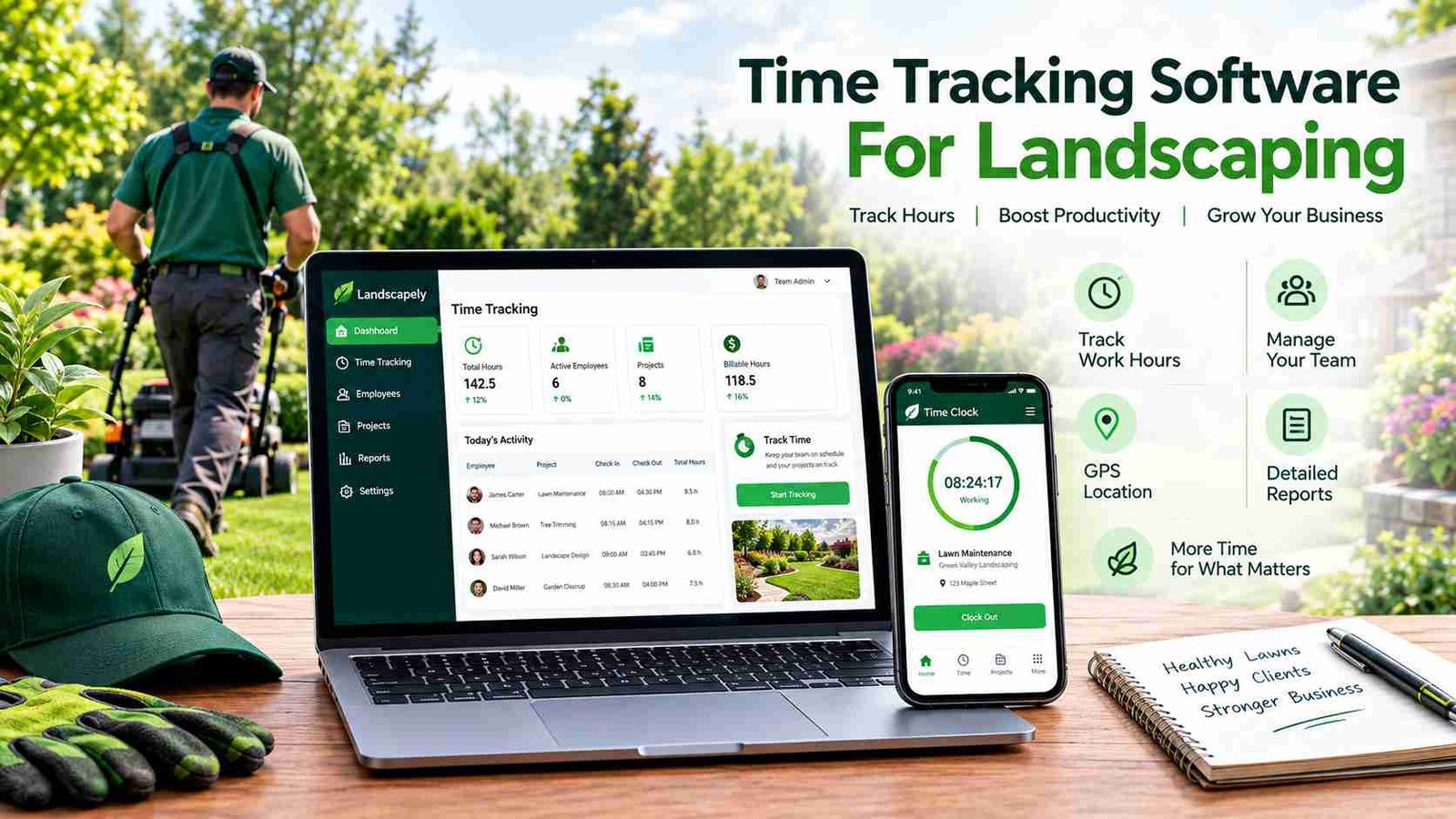
This is where time tracking software for landscaping can make daily operations easier. Instead of relying on handwritten records, landscaping companies can use mobile apps, GPS, digital timesheets, job tracking, and automated reports to record work hours more accurately. Managers can see how much time crews spend at different properties and use that information for payroll, billing, scheduling, and job costing.
The right system can also help a company understand where labor costs are going. When actual working hours are connected to specific jobs, business owners can identify projects that take longer than expected and improve future estimates. This guide explains how landscaping time tracking works, which features matter most, its benefits and challenges, and how to choose and implement the right solution.
What Is Time Tracking Software for Landscaping?
Time tracking software for landscaping is a digital system that records the time employees or crews spend working. Unlike a basic office time clock, landscaping software is designed for employees who regularly move between customer properties and outdoor job sites.
A landscaper might start the day at one residential property, travel to a commercial location, and then visit another customer before finishing work. A useful time tracking system allows the worker to record time against the correct job instead of simply showing that the employee worked for eight hours.
The software can capture clock-in and clock-out times, breaks, overtime, job hours, employee information, and sometimes GPS location. Some systems also track travel time and mileage. This creates a clearer picture of how working hours are distributed across customers and projects.
How Does Landscaping Time Tracking Differs From Standard Employee Time Tracking?
Traditional time tracking often assumes that employees work at one regular location. Landscaping businesses have a different workflow. Crews may have several destinations during the same day, and the time spent at each property can directly affect the profitability of that job.
For this reason, landscaping businesses often need time tracking connected to customers, properties, tasks, and crews. Instead of asking only, “How many hours did this employee work?” managers can also ask, “How many hours did this crew spend maintaining this property?”
What Information Does It Capture?
Depending on the software, records may include start and finish times, breaks, overtime, job assignments, GPS location, travel, mileage, and task information. This information can then be used for payroll, billing, reporting, and job costing.
Why Do Landscaping Companies Need Time Tracking Software?
Manual timekeeping can create small problems that become expensive as a landscaping company grows. Employees may forget to record a start time, enter the wrong job, lose a paper timesheet, or estimate their hours later. Managers then have to spend additional time checking and correcting records.
Digital time tracking creates a consistent record of working hours. Employees can clock in using a phone or another approved device, while managers can review the information before payroll is processed. This reduces unnecessary paperwork and makes missing or unusual entries easier to identify.
Accurate time data is also valuable for understanding labor costs. Suppose a company estimates that a lawn maintenance job should take two hours but repeatedly finds that crews spend three hours there. That difference can affect pricing and profitability. Reviewing historical time records can help the company create more realistic estimates in the future.
GPS and geofencing can add another layer of accountability. A system may verify that an employee is at the correct job location when clocking in. This can help reduce inaccurate location reporting and certain forms of buddy punching, although GPS should be used transparently and according to applicable workplace privacy requirements.
Most importantly, time tracking connects employee hours with actual business activity. It can help managers understand payroll, job costs, productivity, and customer billing from the same set of records.
Key Features of Time Tracking Software for Landscaping
The most useful system is not necessarily the one with the largest number of features. Landscaping companies should focus on tools that match the way their crews actually work.
Mobile Clock-In and Clock-Out
A mobile time clock allows employees to record their hours directly from a smartphone or other supported device. The process should be simple enough that a crew member can clock in without spending several minutes navigating the application.
Mobile access is particularly useful when employees do not report to an office before every job. They can record their time at the appropriate location and move on to their assigned work.
GPS Time Tracking and Geofencing
GPS can record an employee’s location when a time entry is created. This can help managers verify that a crew member is at the expected property.
Geofencing takes this idea further by creating a virtual boundary around a job site. Depending on the system, an employee may be allowed to clock in only within that area or the software may flag entries made outside it.
Job and Task-Based Tracking
A landscaping company may offer mowing, trimming, irrigation, fertilization, cleanup, installation, and other services. Tracking hours by job or task helps managers understand how much labor each service requires.
Crew Tracking
Crew-based tracking is useful when several employees work together at the same property. A foreman or designated employee may manage the crew’s time, while individual systems can provide more detailed employee records when required.
Offline Tracking
Landscaping crews sometimes work in rural areas or properties with weak mobile coverage. Offline functionality allows time entries to be stored and synchronized when the connection becomes available again.
Break, Overtime, Mileage and Travel Tracking
A complete system can also record breaks and overtime while separating travel from actual job-site work. Mileage information may be useful for reimbursement, cost analysis, or operational planning.
| Feature | Why It Matters to Landscaping Businesses |
| Mobile clock-in | Employees can record time from job sites |
| GPS | Helps verify work locations |
| Geofencing | Connects time entries to specific properties |
| Job tracking | Shows where labor hours are being spent |
| Offline mode | Helps when crews have weak connectivity |
| Overtime tracking | Supports accurate payroll records |
| Mileage tracking | Helps monitor travel between properties |
GPS, Job Costing, Scheduling and Payroll: How Everything Connects
GPS and geofencing are useful, but time tracking becomes more valuable when it connects with other business functions. For example, a landscaping company can use location information to verify when a crew arrives at a property, while job-based time records show how long the crew works there.
That information can support job costing. Labor is often a major part of a landscaping project’s total cost. If a company knows the hours worked, employee pay rates, materials, equipment expenses, travel, and revenue, it can develop a clearer picture of project profitability.
The same data can improve estimates. If similar properties consistently require more labor than expected, the company can adjust future quotes rather than relying only on guesswork.
Scheduling is another important connection. Managers can create daily or weekly crew schedules, assign properties, and compare scheduled hours with actual hours. When an employee is absent or weather changes the schedule, managers can make adjustments and communicate them to the crew.
Payroll integration can reduce administrative work as well. Approved digital timesheets can be exported or transferred to a payroll system, reducing the need to manually copy hours from paper records.
This creates a simple operational cycle: schedule the work, track the time, connect the hours to the job, review the results and use the information to improve future work.
Reports, Benefits and Landscaping-Specific Challenges
Reports turn individual time entries into useful business information. Managers can review employee hours, overtime, attendance, job labor costs, missing punches, and estimated-versus-actual hours. Over time, these reports can reveal patterns that are difficult to see from individual timesheets.
For example, one crew may consistently complete certain maintenance jobs faster than another. A manager can investigate whether the difference comes from crew size, route planning, equipment, job conditions, or another factor. The goal is not simply to monitor employees but to understand how the business operates.
Landscaping companies also face challenges that ordinary office businesses may not have. Crews work across multiple locations, mobile coverage may be unreliable, and weather can change plans with little warning. Seasonal businesses may also hire additional workers during busy periods, meaning the software must be easy to scale.
Different landscaping services create different time requirements too. Mowing a regular lawn is not the same as installing a landscape, maintaining irrigation, caring for trees, or completing a seasonal cleanup. Job-based tracking makes it easier to separate these activities.
The benefits can therefore extend beyond payroll. Better records can reduce administrative work, improve customer billing, strengthen job costing, support scheduling, and provide better information for business decisions.
How to Choose and Implement Time Tracking Software for Landscaping?
Before choosing software, a landscaping company should first understand its current workflow. Consider how many employees and crews are involved, how many properties are visited each day, and whether the company mainly serves residential or commercial customers.Next, identify the features that are genuinely necessary. A small company may need simple mobile timesheets, while a larger operation may require GPS, geofencing, job costing, scheduling, payroll integration, and crew management.
Mobile usability should receive special attention. If clocking in is complicated, employees may avoid using the system correctly. Offline support is also important when crews work in areas with unreliable cellular service.Integration is another factor. Software that connects with payroll, accounting, scheduling, CRM, or invoicing systems can reduce duplicate data entry. Pricing should be considered alongside the number of users, available features, setup costs, integrations, and any additional charges.
Implementation should happen gradually. First, identify current timekeeping problems. Then configure employees, crews, customers, and job sites. Set up geofences where appropriate, connect payroll or accounting systems, and train employees on the correct clock-in process.
Before making the system standard for everyone, test it with a small group. Check whether location records are accurate, offline entries synchronize correctly, and employees understand how to select the correct job.
Finally, review reports regularly. Software only creates value when the company uses the information it collects.
Time Tracking Software vs. Full Landscaping Management Software
A basic time tracking tool focuses mainly on employee hours. It may provide digital clock-ins, timesheets, GPS features, and payroll exports. This can be enough for a small business that already has separate systems for scheduling, customer management, estimates, and invoicing.
Full landscaping management software generally covers a wider part of the business. Along with time tracking, it may include scheduling, routing, customer management, estimates, job costing, invoicing, and payments.
The right choice depends on the company’s workflow. A small lawn care business may not need a large all-in-one platform. A growing company with several crews and many properties may benefit from having scheduling, time, customer, and financial information connected in one place.
The important question is not which system has the longest feature list. Instead, ask whether the software solves the company’s actual problems. A simple system that employees use consistently can be more useful than a complicated platform that creates confusion.
Frequently Asked Questions
1. Can time tracking software help landscapers create better estimates?
Yes. Historical time records can show how long similar jobs actually take. A company can use this information to adjust future labor estimates instead of relying only on assumptions.
2. Does GPS tracking use a lot of employees’ phone batteries?
GPS usage varies by application and tracking method. Businesses should test the software in real working conditions and check how frequently it records location before adopting it for an entire crew.
3. Can one system track several landscaping crews?
Many systems support multiple employees, crews, customers, and job locations. This allows managers to organize time records without maintaining separate paper systems for each team.
4. Should travel time be included in landscaping time records?
That depends on the company’s payroll rules, contracts, and local requirements. Separating travel time from job-site time can nevertheless help managers understand the true cost of moving crews between properties.
5. What should a landscaping business do if employees forget to clock out?
The manager can review missing or unusual entries and correct them according to company procedures. Regular reminders and simple clock-out processes can reduce repeated missing punches.
Conclusion
Time tracking software for landscaping can turn a difficult manual process into a more organized system for managing employees, crews, customers, and job costs. Mobile clock-ins, GPS, geofencing, job-based tracking, scheduling, payroll integration, and reporting can give landscaping businesses a clearer view of where working hours are going.The best solution depends on the size and workflow of the business. A small lawn care company may only need simple digital timesheets, while a larger landscaping operation may benefit from an integrated system covering scheduling, job costing, and crew management. Before choosing software, focus on practical needs, ease of use, mobile reliability, privacy, integrations, and scalability. When implemented properly, accurate time data can support better payroll, estimates, scheduling, billing, and day-to-day decisions.